01
That tiny table looked like a stool. Put yourself, a friend or your pet in the moment someone quietly realizes it is not.
THE PHOTOReference example from another site, not a generation from this tool. Your result is a new MiniMax H3 video at the settings you select; faces and movement may vary.
A short scene, made around your photo.
Explore the scene, then make your own version.


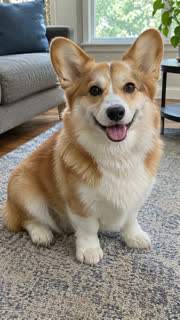
Reference example from another site, not a generation from this tool. Your result is a new MiniMax H3 video at the settings you select; faces and movement may vary.
The scene turns on a small misunderstanding: one guest treats the wall-mounted table like a seat. Another sets down a cup, and the first guest notices. For a short clip, keep it to a glance and a small slide toward the bench; allow more time for an entrance in a longer clip.
Choose a clear, well-lit image
Skip crowds, hidden faces and heavy filters
Match the action to your selected video length
Add captions and licensed music after download
Keep the caption short. Let the scene carry the joke.
Use good light and one subject per image. Keep the face visible and leave room around the body for movement.
Pick the role and scene, then review the direction before generating a 768P clip.
Check your saved task while the AI works. When it is ready, download the video and label it as AI-generated when sharing.
Eligible verified accounts can try one five-second 768p clip without a reference video. Buy Vyi credits to make more videos.
A verified account gets one free five-second 768P generation, shared across the cafe and bicep heart tools. Reference videos use paid credits.
Your uploads are stored by this site and sent to the video provider to make your clip. Read our privacy policy before uploading personal photos. We do not promise automatic deletion on a schedule.
No specific song or soundtrack is included in the promise. Add music that you have rights to in your editing or social app. AI audio and exact movement can vary.
We check about every eight seconds and pause automatic checking after fifteen minutes. Keep the task ID and check again later. A paused check does not cancel the supplier task or trigger a second charge.
A five-second 768p video uses 8 Vyi credits at the default settings. Changing the duration, resolution or video reference changes the quote. Outputs over 15 seconds double both the video and reference charges. Confirmed failures return the reserved credits.
The examples show the scene idea, not a guaranteed result. MiniMax H3 creates a new clip from your inputs. Hands, identity, furniture and timing can differ; review the result before sharing.
One photo casts your chosen role and leaves the other guest to the AI. Choose Both of us and add two separate photos to guide both characters. Two photos are reference images, not start and end frames.
Choose a full-body or knees-up image so the model can place the subject by the table and bench. A clear pet photo works as a creative direction, though animal movement is less predictable.
A photo you like. A scene you did not see coming.
Make my first video